USB Audio Player PRO
- 4.0
- Rating
- 100.00K
- Installs
- $6.29
- Price

 Analysis by App-foxy
I approached USB Audio Player PRO as someone looking for more than a basic phone music player. Its focus is clear: it is a Music & Audio app from eXtream Software Development, built around careful playback, USB audio DAC support, and high-resolution audio hardware. That makes it more specialized than the player already installed on most Android phones, but specialization also means a steeper learning curve.
After spending time with it, my impression is that this is a tool for listeners who care about how their music is delivered, not just whether a song starts quickly. It can make sense for someone using an external DAC, a serious wired headphone setup, or a carefully organized local library. It is less convincing for a listener who mainly streams casually, wants a very simple interface, or expects every part of the experience to feel effortless.
How the interface feels when clarity matters
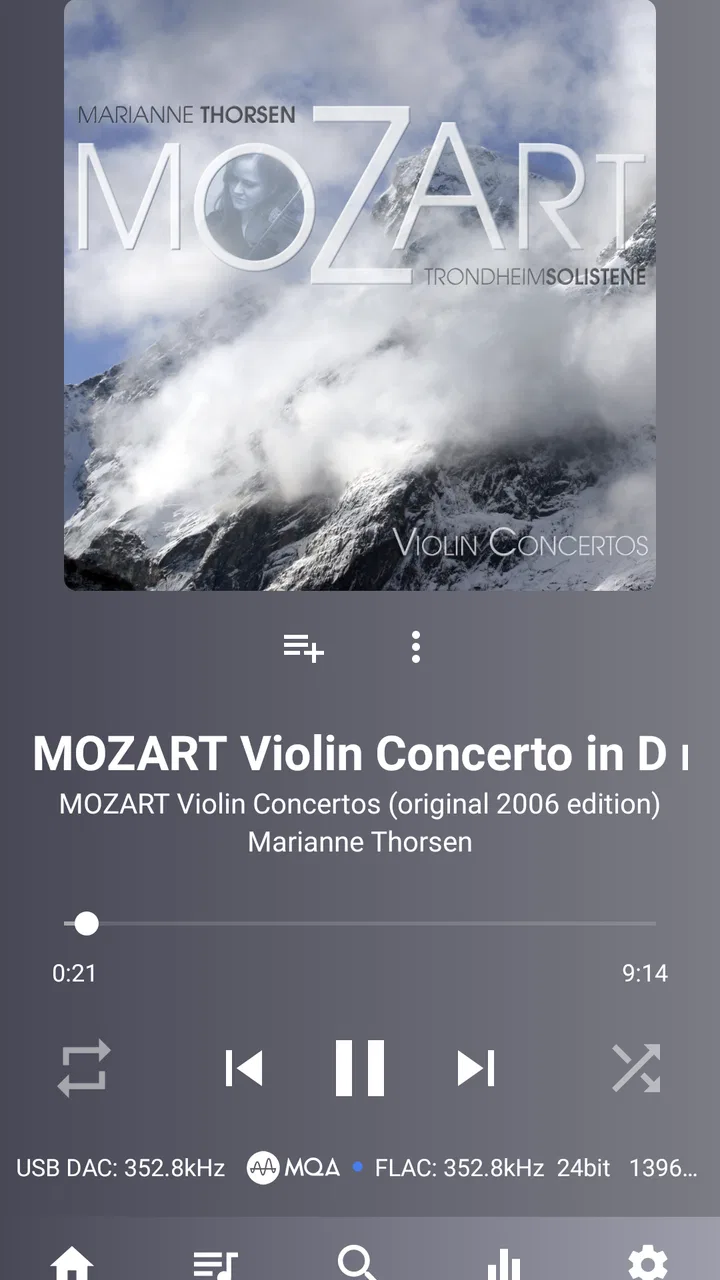
The first thing I noticed is that the app presents a lot of information. Album art, track details, playback controls, library sections, output choices, and audio settings all compete for attention. That density is understandable for a player aimed at advanced listening, but it affects readability and navigation. I found myself needing to slow down and learn where the important controls lived instead of relying on instinct.
You May Also Like

 Pandora - Music & Podcasts
Pandora’s Music Is Easy to Start, but Harder to Recover
Pandora’s strength is its low-effort path from a seed to a station. Its weak spot is how much confidence it asks you to place in connection, setup, and quiet recovery.

 AccuWeather: Weather Radar
AccuWeather Review: A Quick, Clear Forecast for Everyday Decisions
For everyday plans, the best forecast is the one you can understand quickly. AccuWeather makes rain timing, radar, and local conditions easy to act on, with a few trade-offs.

 Hill Climb Racing
Why Hill Climb Racing Still Turns Crashes Into One More Run
A tiny car, a bumpy hill and one more upgrade: Hill Climb Racing keeps resurfacing because its simple chaos makes every near-miss feel personal.

 AliExpress - Shopping App
AliExpress Makes Global Shopping Feel Personal, but Shoppers Bear the Risk
AliExpress turns a global marketplace into a pocket-sized discovery engine. Its reach is useful, its shopping loop compelling, and its trade-offs easy to miss.

 Lords Mobile: Kingdom Wars
Lords Mobile Is a Kingdom-Building Routine, Not a Quick Match
A case-by-case verdict on the building, battles, device demands, and social commitments that make Lords Mobile rewarding for some players and exhausting for others.

 PDF Scanner app - TapScanner
TapScanner Makes Paperwork Easier to Capture, Check, and Share
TapScanner makes scanning with a phone feel less like a rescue operation and more like a dependable step in getting work done. Its capture tools are useful, though not flawless.
More From Our News Desk
View All News


For a confident Android user, this depth can be useful. The app gives the impression that playback is being treated as a configurable process rather than a single play button. I could think about the library, output path, and listening equipment separately. For a new user, however, the same flexibility may feel like clutter, especially when the goal is simply to select an album and listen.
I recommend beginning with a small, practical setup rather than opening every audio option at once. First import or locate the music you actually use, confirm that the desired output is selected, and play a familiar recording. Only then is it worth exploring more specialized controls. This approach makes it easier to understand whether a change improves your experience or merely changes a technical value on screen.
Text-heavy screens can also create friction for people who need strong visual hierarchy. A reader with reduced vision may prefer a larger system font, high display contrast, and a device layout that keeps controls separated. Those adjustments come from the phone and operating system rather than from a promise that the app itself is optimized for every visual need. In my experience, the app is most comfortable when the device is already configured for clear reading.
Navigation is more manageable once I treated the player as a library and equipment tool instead of a streaming-style app. The usual alternatives often hide technical choices behind a very simple interface. Here, the advantage is access to more detail; the trade-off is that I had to remember where I had changed something. That is a fair exchange for enthusiasts, but not necessarily for someone who wants zero setup.
Learning the library without making it harder than necessary
One useful habit is to keep the first listening session deliberately narrow. I would choose a few albums with known file quality and familiar mastering, then compare the same material under the intended output setup. This gives the interface a purpose: I am not browsing aimlessly, I am checking whether the player fits my listening routine.
The app becomes easier to judge when the library is organized before the technical evaluation begins. Messy folders, inconsistent tags, and duplicate files can make any local player feel confusing. USB Audio Player PRO cannot turn an untidy collection into a perfectly understandable one by itself. If your music is already difficult to find, spend time arranging it first; otherwise, you may blame the player for a library problem.
I also found that the interface rewards short, repeatable routines. Open the library, choose the album or playlist, verify the output when needed, and leave the rest alone. That routine is particularly helpful for anyone who finds long menus tiring or who prefers not to make fine adjustments while already listening.
Controls, touch precision, and different ways of listening
Touch interaction is central, so motor comfort matters. Small controls, closely placed options, and settings that require several taps can be challenging for people with tremors, limited dexterity, or fatigue. I would not recommend changing advanced audio choices while walking, commuting, or holding the phone awkwardly. The app is better suited to a stable setup where I can tap accurately and check the result.
A practical workaround is to configure the player at home and then use a simple playback routine away from home. This reduces the number of precise interactions needed in public. It also lowers the chance of accidentally changing an output setting, skipping a track, or opening a technical panel when I only wanted to pause.
For users who rely on external controls, the experience depends heavily on the phone, connected equipment, and Android environment. I would test pause, play, track changes, and volume behavior before committing to a long listening session. A player can be technically capable while still feeling awkward if the surrounding hardware is not convenient to operate.
There is another motor-related consideration: an external DAC can add a physical connection that must remain secure. That may be worthwhile for sound quality or equipment compatibility, but it introduces a cable, adapter, or separate device into the routine. Someone who values a clean, low-effort setup may prefer the phone’s built-in audio path or a simpler wireless solution, even if that gives up some of the control this app is designed to provide.
On the sensory side, the app is most valuable to people who can hear and appreciate differences in their equipment, recordings, or output chain. It does not automatically make every track sound better simply because a high-resolution option is available. The recording itself, headphones, DAC, file quality, and listening environment all matter. I would avoid buying it purely because “high resolution” sounds impressive; the benefit depends on the whole system.
Using it at home, during travel, and in shared spaces
At home, the app makes the most sense. I can connect the intended hardware, sit down with a familiar album, and leave the settings alone once everything behaves as expected. This is where the detailed approach feels justified. A listener building a desk setup or a dedicated wired listening routine is more likely to appreciate it than someone who changes devices constantly.
Travel is a different story. An external DAC may be excellent at a desk but inconvenient on a train, in an airport, or while moving between rooms. There is more equipment to carry and more connections to protect. The app can still be useful on the go, particularly for someone with a local collection and wired headphones, but I would decide in advance which setup is practical rather than assuming the most advanced configuration is always the best one.
In a realistic everyday scenario, imagine finishing work and wanting to listen to an album without notifications or streaming interruptions. I would connect my wired equipment, open a familiar album, confirm that the player is using the intended output, and start playback. Once configured, that routine can be satisfying because the app stays focused on local listening. If I were rushing out the door, though, I would probably choose a simpler player and leave the specialized setup at home.
Shared spaces also expose a limitation that is easy to overlook. Audio settings that are useful with one pair of headphones may not suit another person’s equipment or hearing preferences. If several people use the same phone, the technical flexibility becomes a possible source of confusion. A simpler player is often friendlier for a household where nobody wants to maintain a personal audio profile.
For people with sensory sensitivities, a dedicated local player can be helpful because it avoids the visual and recommendation-heavy atmosphere common in streaming services. I can focus on a chosen album instead of navigating an endless feed. At the same time, the app’s technical screens may feel overwhelming to someone who is sensitive to information density. The calmer experience comes from using a limited routine, not from assuming the interface is universally minimal.
What the app does well for careful listeners
The strongest part of USB Audio Player PRO is its clear commitment to the audio path. Its store summary highlights USB audio DACs and high-resolution audio chips, and that focus separates it from ordinary phone players. I see the value when the phone is part of a deliberate wired system and I want the player to work with that equipment rather than treating it as an afterthought.
It is also a good match for listeners who keep music locally. Local playback can be more predictable than depending on a changing streaming catalog, a network connection, or a recommendation interface. I can choose my own files and build a routine around albums I already own. That does not make the app universally better than streaming services; it simply serves a different relationship with music.
The app’s current version is 7.1.2.3, and its history reaches back to its release on December 24, 2013. I mention that because the product feels like an established specialist rather than a newly designed beginner tool. Its identity has been shaped around serious playback over time, which helps explain both the depth and the less immediate learning experience.
Its audience is not tiny, but it is specific. The app has an average rating of 4.0 from around 15 thousand ratings, with roughly 1.4 thousand written reviews and over 100 thousand installs. Those figures suggest meaningful interest without making it a universal default. I read that as a useful warning: plenty of people find the app worthwhile, but the right equipment and expectations matter.
I particularly like the trade-off between control and commitment. If I already own a USB DAC and wired headphones, this app gives that setup a reason to exist on Android. If I do not have compatible equipment and cannot hear a meaningful difference in my normal listening, the extra complexity becomes harder to justify.
Where the experience becomes less inclusive
The biggest barrier is not one missing feature; it is the combination of technical language, dense choices, and hardware dependence. Someone with limited technical confidence may not know which settings are essential and which can be ignored. Someone with limited dexterity may find repeated taps and small targets tiring. Someone with low vision may need device-level display adjustments before the interface becomes comfortable.
That does not make the app unusable, but it changes who can enjoy it without assistance. A friend or family member could help with the initial setup, after which playback may be straightforward. Still, relying on another person is not ideal for independent use, so I would only recommend this route if the listener genuinely wants the audio capabilities.
Cost is another part of the decision. The app is listed at $6.29, and its in-app purchases range from $2.99 to $4.99 per item. For an enthusiast, that may be reasonable next to the cost of headphones or a DAC. For a casual listener, it is harder to defend when many basic players are free or already included with the phone. I would treat the purchase as an equipment decision, not as a small upgrade everyone needs.
The age rating is Everyone, which makes the app broadly suitable from a content-rating perspective. That does not mean every interface choice will suit every age or ability. A child, older adult, or first-time audio hobbyist may still need a simpler starting point, especially if the device is shared or the music library is large.
I would also skip it if your main requirement is effortless streaming discovery. The app’s strengths are tied to playback control and audio hardware, not to replacing the social, recommendation, and subscription experience of a modern streaming service. Likewise, if you mostly use wireless earbuds and never connect a USB DAC, a conventional player may offer a smoother daily experience with less configuration.
How it compares with ordinary phone players
The default phone player usually wins on immediate usability. It tends to be easier to open, easier to understand, and less intimidating for occasional listening. A mainstream streaming app wins when I want a large catalog, automatic recommendations, synchronized access across devices, or a familiar interface for other people in the household.
USB Audio Player PRO wins in a narrower contest: using Android as part of a serious local playback chain. Its value grows when the listener owns compatible hardware, cares about output behavior, and is willing to learn the controls. The difference is not simply that one app has more buttons. It is that this app asks me to think about the relationship between the music file, the Android device, and the external audio equipment.
That comparison also explains why I would not recommend it based only on a technical specification. If your listening happens mostly through inexpensive earbuds in noisy places, the environment may hide the differences you are trying to pursue. In that case, convenience, battery life, and reliable controls are probably more important than specialized output handling.
On the other hand, a listener with a quiet room, good wired headphones, and a collection of carefully chosen files may find the extra attention worthwhile. The app gives that person a more intentional workflow. It does not remove every variable, but it makes the playback setup feel like something I can examine and adjust rather than simply accept.
My practical setup advice
I would begin by installing the app on a compatible Android device running at least Android 6.0, then testing it with one known album and the equipment I actually plan to use. Do not start by judging it with unfamiliar music. A recording I know well makes it easier to notice whether the experience is clearer, more stable, or simply different.
Next, I would establish a “safe” everyday configuration and avoid changing it casually. Write down or remember the output path, headphone connection, and any setting that affects your normal playback. This is especially helpful for users who find technical menus difficult to revisit. The goal is to turn a complex tool into a predictable appliance.
For accessibility, I would pair the app with a phone setup that already works for you: larger system text if needed, a comfortable display contrast, stable device placement, and headphones that do not require constant adjustment. Use the app’s strengths where they help, but do not add an external DAC merely because it is possible. Extra hardware can improve a listening chain while making physical access more difficult.
I would also keep a simpler alternative installed if the phone is shared or if I travel often. That is not a failure of this app; it is a sensible division of roles. A specialized player can handle focused listening at home, while a basic player can handle quick playback when speed and low effort matter more.
My inclusive verdict
USB Audio Player PRO is a capable specialist app with a clear purpose. I recommend it to Android listeners who use local music, own or plan to use USB audio hardware, and enjoy having meaningful control over playback. Its best experience comes from a prepared setup and a willingness to learn, not from opening it casually and expecting instant simplicity.
For accessibility, I see a mixed but understandable picture. The app can support different contexts when I reduce the number of choices, configure the system carefully, and keep the hardware stable. It is less welcoming when someone needs large, widely spaced controls, minimal technical language, or effortless operation without setup. I would not describe it as universally accessible, but I also would not dismiss it for users who can adapt the surrounding device and value its audio focus.
The key question is not whether the app has more audio options; it is whether those options solve a real problem in your listening routine. If they do, the price and learning curve can be worthwhile. If your priority is quick streaming, wireless convenience, or a very simple interface, an ordinary player will probably serve you better.
My final recommendation is therefore selective rather than automatic. For a careful wired listener, this is a serious and useful addition to Android. For everyone else, I would try the simplest player that meets the need first and move to this one only when external audio hardware or playback control becomes important. That distinction is what makes the app valuable: it is not trying to be everything, and it works best when your listening habits match its specialized design.
FAQs for USB Audio Player PRO
01What is USB Audio Player PRO and who is it designed for?
USB Audio Player PRO is a music player for Android aimed at listeners who want higher-quality playback and more control than a typical phone music app provides. It is especially useful for people using USB DACs, portable headphone amplifiers, wired headphones, or locally stored lossless music. The app can also manage music libraries, playlists, album artwork, and several advanced audio settings.
02Does USB Audio Player PRO work with every Android phone and USB DAC?
Compatibility depends on the Android device, its USB support, the adapter or cable being used, and the DAC itself. In many cases, the app can connect directly to a USB DAC and bypass parts of the Android audio system, but not every phone supplies enough power or handles USB audio reliably. Checking your device, Android version, cable, and DAC compatibility before downloading is recommended.
03Can USB Audio Player PRO play FLAC, DSD, and other high-resolution formats?
The app supports a broad selection of audio formats, including common lossless files such as FLAC, as well as high-resolution formats and, depending on the setup, DSD playback. Actual output quality is determined by the source file, Android device, USB DAC, connected headphones, and app configuration. A high-resolution file alone cannot guarantee better sound if the rest of the equipment is limited.
04Can I use USB Audio Player PRO with streaming services?
USB Audio Player PRO is primarily focused on local music playback and direct audio output through compatible hardware. It may offer access to selected online music services or integrations, but support can vary by service, subscription, region, and app version. Users who mainly stream should verify the current service compatibility and available features before treating it as a replacement for every official streaming application.
05Is USB Audio Player PRO free, and is it worth paying for?
USB Audio Player PRO is generally offered as a paid Android application rather than a completely free player. Whether it is worth the purchase depends on your equipment and listening habits. The advanced USB DAC support, high-resolution playback, library tools, and audio controls can be valuable for audiophiles, while casual listeners using Bluetooth or basic phone speakers may notice fewer practical benefits.
Pros
- Supports high-resolution audio formats and bit-perfect playback.
- Works with many USB DACs
- interfaces
- and external audio devices.
- Offers powerful parametric EQ and tone adjustment options.
- Can access music from network storage and various cloud services.
- Frequent updates improve compatibility and add useful audio features.
Cons
- Some advanced features require separate in-app purchases.
- USB playback may drain the phone battery quickly.
- Setup can be confusing for users unfamiliar with audio settings.
- Not all phones provide reliable USB OTG or DAC compatibility.
- The interface feels functional but less polished than mainstream music apps.

USB Audio Player PRO
Gallery